
Global nodes
Global nodes can be transitioned to from any other node in your flow. They are typically used to handle emergency scenarios or abnormal user behavior.
You may turn any node into a global node by enabling Global node in its settings and defining the conditions for transitioning to it.
Conditions are typically defined using “free text”.
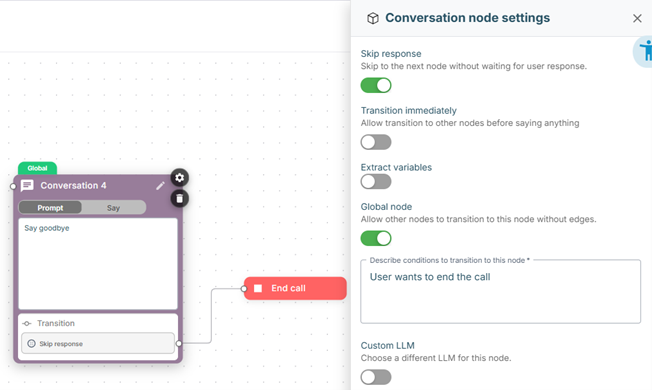
Alternatively you can use logical statements by enclosing them in brackets – for example (visits_count > 1). See Conversation node transitions for more details, Expression syntax for the supported operators and functions, and Dynamic variables for variables you can reference in the conditions.
Fallback node
A global node whose condition is set to #fallback acts as the flow's fallback node: it becomes the target for any transition that is left unconnected. For example, an empty / Else transition, or a node's default "continue" transition, that you did not wire to a specific node, routes to the fallback node instead of ending the flow. This lets you handle all otherwise-dangling transitions in a single place rather than connecting each one individually.
Use at most one #fallback node per flow.